网站首页 美食营养 游戏数码 手工爱好 生活家居 健康养生 运动户外 职场理财 情感交际 母婴教育 生活知识 知识问答

DataGrip怎么关闭如果空间不足则隐藏选项卡

时间:2026-02-16 13:59:43

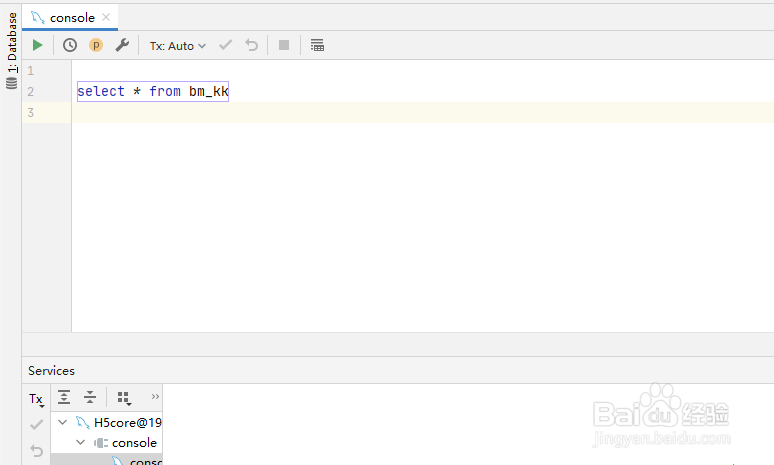
1、首先,打开一个DataGrip的界面中
DataGrip怎么关闭如果空间不足则隐藏选项卡

2、点击左上角中的 file 菜单

DataGrip怎么关闭如果空间不足则隐藏选项卡

3、点击了file菜单之后,弹出了下拉选中为 settings 选项

DataGrip怎么关闭如果空间不足则隐藏选项卡

4、进入到了settings界面中,点击左侧中的 editor tabs  选项

DataGrip怎么关闭如果空间不足则隐藏选项卡

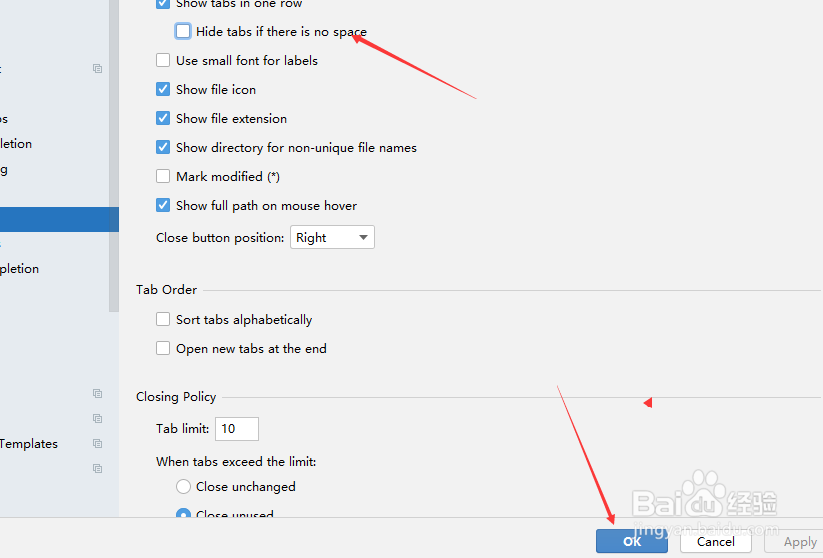
5、进入到了editor tabs的界面中,去掉勾选上 hide tabs if there is no space 选项

DataGrip怎么关闭如果空间不足则隐藏选项卡

6、去掉勾选上 hide tabs if there is no space 选项之后,点击 ok
DataGrip怎么关闭如果空间不足则隐藏选项卡

1、点击左上角中的 file 菜单

选中为 settings 选项

点击左侧中的 editor tabs  选项

去掉勾选上 hide tabs if there is no space 选项

© 2026 智德知识库
信息来自网络 所有数据仅供参考
有疑问请联系站长 site.kefu@gmail.com