1、点击打开iTunes。

2、点击上方工具栏菜单的【编辑】。

3、选择【偏好设置】。

4、选择【高级】按钮。
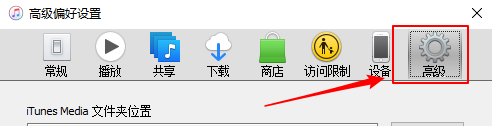
5、默认itunes图标托盘显示没有勾选。

6、点击勾选。

7、点击【确定】按钮。

8、我们可以看到itunes图标已经显示在右下的系统托盘上了。

1、点击打开iTunes。
2、点击上方工具栏菜单的【编辑】。
3、选择【偏好设置】。
4、选择【高级】按钮。
5、默认itunes图标托盘显示没有勾选。
6、点击勾选。
7、点击【确定】按钮。
8、我们可以看到itunes图标已经显示在右下的系统托盘上了。